
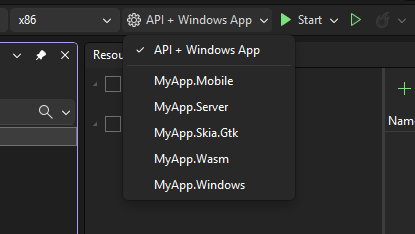
Multi-Project Launch Profiles in Visual Studio
Developing apps connected to an API or microservices that talk to each other can be tricky. The new Multi-project launch profiles in Visual Studio make launching multiple projects significantly easier!
Are you missing snippets in Visual Studio IntelliSense? Don't worry, it's an easy fix! Check out this blog post to learn how to bring back those invaluable code shortcuts. Plus, find out why the setting mysteriously switched in the first place!
Learn how to create a blank solution in Visual Studio without the hassle of dealing with nested folders. Discover a simple fix and a more flexible option using the dotnet CLI. Check out the article to find out the step-by-step instructions!
Discover how to set up your own Azure VM build agent to optimize your build times in Azure DevOps. By creating your own agent, you can cache dependencies and packages, resulting in faster subsequent builds. Learn the step-by-step process and reap the benefits of improved build performance.
Chcete zjistit, jak spustit a ladit UWP aplikace pomocí Visual Studia? Tento článek vám ukáže různé způsoby, jak správně spustit aplikaci s laděním, ladit události životního cyklu a úlohy na pozadí a připojit se k běžící instanci aplikace. Navíc se dozvíte o dalších funkcích a tipy na ladění. Přečtěte si více!
.NET Standard přinesl novou éru přenositelnosti knihoven mezi jednotlivými implementacemi .NETu a předčil Portable Class Library ve všech směrech. UWP podporuje .NET Standard 2.0 od Fall Creators Update, ale při ladění se může objevit problém s chybějícími breakpointy. Naštěstí existuje jednoduché řešení!
Discover how to solve the debugging issue in UWP when using .NET Standard libraries! Get insights on the problem and step-by-step solutions to make your debugging process smooth. Say goodbye to unnecessary headscratching and keep your coding flow intact!
Explore the highlights of the final day at the Build 2018 conference! From Conversational AI to supercharged debugging in Visual Studio, this post keeps you informed about the latest technologies and sessions. Plus, don't miss the exciting Build celebration at the Museum of Pop Culture in Seattle! Check it out now.
Zajímá vás, jak udržet váš fork GitHub projektu aktuální vůči původnímu repozitáři? Stačí přidat upstream remote! V článku se dozvíte, jak na to pomocí Visual Studia a Team Exploreru. Přečtěte si, jak provést fetch aktuálního stavu upstreamu a snadno provést merge posledních změn do svého forku.
Learn how to easily keep your GitHub fork up-to-date within the Team Explorer window in Visual Studio. Discover the simple steps to add the upstream remote, fetch the latest changes, and merge them into your fork. Stay synced with ease!
Potřebujete přeinstalovat balíčky ve vašem projektu? Zkuste použít příkaz Update-Package -reinstall v NuGet Package Manageru. Tento článek vám ukáže, jak to udělat ve Visual Studiu. Takhle jednoduché to je!
Having issues with NuGet packages in your Visual Studio project? Don't worry, there's a solution! Find out how to force-reinstall all packages using the Package Manager Console. Click to learn more!